
Download Daktari – Powerful HTML & XML Editor for Mac
Overview – What Makes Daktari Stand Out?
Daktari is a trial‑version Mac application that targets web developers, designers, and anyone who needs a reliable HTML or XML editor. First added to our catalog in 2006, Daktari has been downloaded over 170 times, and although its recent weekly download count is low, the software still holds a niche appeal because of its lightweight footprint and straightforward interface. Version 1.3, last updated on May 30 2008, runs on Mac OS X and earlier releases, making it compatible with both legacy and relatively modern Mac machines.
The program is offered only in English and is positioned in the Development category under the Internet sub‑category, specifically “HTML & XML Editors”. Its primary promise is to let users edit and write web pages efficiently without demanding large amounts of hard‑drive space, a benefit for developers who work on multiple projects or on older hardware. Daktari’s trial model lets you explore its core capabilities before deciding on a purchase, and the download process is secure, fast, and completely free of hidden fees.
Whether you are polishing a static site, tweaking XML configuration files, or drafting a quick prototype, Daktari aims to be a no‑frills, dependable tool that keeps the focus on code rather than on distracting UI elements.
Key Features – What Daktari Offers to Web Developers
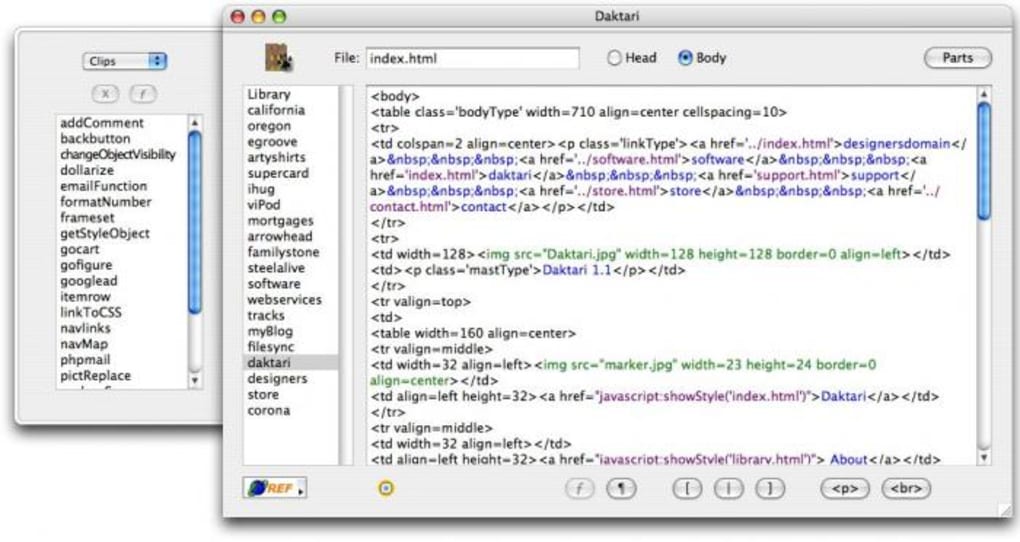
- Syntax Highlighting for HTML & XML: Daktari automatically colors tags, attributes, and values, helping you spot errors instantly.
- Live Preview Mode: A built‑in preview window renders your HTML pages in real time, eliminating the need to switch to a browser.
- Code Folding: Collapse and expand sections of code to keep large documents manageable.
- Search & Replace with Regular Expressions: Powerful find‑and‑replace tools speed up bulk editing tasks.
- Auto‑Completion for Tags and Attributes: Reduce typing effort and prevent typographical mistakes.
- Integrated File Manager: Quickly browse, open, and save files within the same workspace.
- Customizable Color Schemes: Choose from pre‑defined themes or create your own to match your visual preferences.
- Lightweight Installation: Requires less disk space than many competing editors, making it ideal for older Macs.
- Export Options: Save your work as plain HTML, XML, or even as a PDF snapshot of the preview.
- Trial‑Version Flexibility: Full access to all features during the trial period, with a clear upgrade path.
These features collectively make Daktari a solid choice for developers who need a focused environment without the overhead of larger IDEs. While it may lack some of the advanced debugging tools found in premium editors, its simplicity translates into faster load times and a smoother learning curve for beginners. The live preview and auto‑completion features, in particular, help streamline the development workflow, allowing you to iterate quickly on web page designs.
Installation, Usage & Compatibility – Getting Started on macOS
Downloading Daktari is a straightforward process. After clicking the “Download” button on the official page, the installer (a .dmg file) is saved to your Downloads folder. Double‑click the .dmg to mount the disk image, then drag the Daktari icon into your Applications folder. The entire installation typically takes under two minutes, even on older machines, because the package size is intentionally kept small.
Step‑by‑Step Installation Guide
- Visit the official Daktari download page and click the “Free Download” button.
- Save the .dmg file and verify its integrity using the provided SHA‑256 checksum (optional but recommended for security).
- Open the .dmg file and drag the Daktari icon to the Applications folder.
- Eject the mounted disk image once the copy is complete.
- Launch Daktari from the Applications folder; macOS may prompt you to confirm that you trust the developer – click “Open”.
First‑Run Configuration
When you launch Daktari for the first time, a brief welcome wizard guides you through basic preferences: selecting a default color theme, configuring auto‑save intervals, and setting the default folder for new projects. Because Daktari is a trial version, a non‑intrusive banner appears at the bottom of the window reminding you of the trial status and offering a one‑click upgrade link.
Operating System Compatibility
Daktari officially supports Mac OS X 10.4 (Tiger) and all subsequent releases, including macOS Catalina, Big Sur, and Monterey. The software runs natively on Intel‑based Macs and, thanks to Apple’s Rosetta 2 translation layer, also works on Apple Silicon (M1/M2) devices. Users with older PowerPC Macs may experience reduced performance, but the lightweight nature of Daktari usually mitigates major slowdowns.
Everyday Usage Tips
After installation, start by creating a new HTML file via File → New → HTML Document. The editor immediately applies syntax highlighting. Use ⌘ + Space to trigger the auto‑completion menu for tags, and press ⌘ + F for the powerful search‑and‑replace dialog. The live preview can be toggled with ⌘ + P, allowing you to see changes as you type. For larger projects, organize files into folders using the integrated file manager; you can drag and drop files directly into the preview pane for instant rendering.
Pros, Cons, FAQ & Final Verdict
Pros
- Very low disk‑space requirement – ideal for older Macs.
- Intuitive interface that reduces the learning curve for beginners.
- Live preview and auto‑completion speed up development cycles.
- Supports both HTML and XML with robust syntax highlighting.
- Trial version offers full feature access without time‑limit restrictions.
Cons
- Lacks advanced debugging tools and integrated version control.
- No native Windows or Linux version – Mac‑only.
- Last major update was in 2008, so some modern web standards may be missing.
- Upgrade path requires a one‑time purchase; no subscription model.
- Limited documentation compared with larger IDEs.
Frequently Asked Questions
Is Daktari still actively supported?
The last official update was released on May 30 2008. While the core functionality remains stable, there are no announced plans for future feature updates or major bug fixes.
Can I use Daktari to edit CSS or JavaScript files?
Daktari focuses on HTML and XML. It can open plain‑text CSS or JavaScript files, but it does not provide language‑specific highlighting or tooling for those formats.
What is the cost of the full version after the trial?
The full license is priced at $29.99 USD, a one‑time payment that unlocks all features permanently.
Does Daktari support modern HTML5 tags?
Basic HTML5 tags are recognized, but the editor does not provide exhaustive validation for newer specifications such as Web Components or custom elements.
Is there a way to import settings from another editor?
Daktari does not include an import wizard for external configuration files. Settings must be configured manually within the preferences pane.
Final Verdict & Call to Action
Overall, Daktari delivers a focused, lightweight solution for Mac users who need a reliable HTML and XML editor without the overhead of a full‑blown IDE. Its strengths lie in a clean UI, live preview, and minimal system requirements—making it especially appealing for students, freelancers, and developers working on legacy Mac hardware. However, the lack of recent updates and the absence of advanced features such as integrated Git support may steer power users toward more contemporary alternatives.
If you value speed, simplicity, and a straightforward editing environment, Daktari’s trial version is worth downloading and testing on your Mac. Should the tool meet your expectations, the one‑time purchase unlocks the complete feature set for a modest price.
Review Summary: Daktari is a solid, no‑frills HTML/XML editor for macOS. It scores high on performance and usability, but falls short on modern web‑development features. Ideal for lightweight editing tasks and older Mac systems.







